
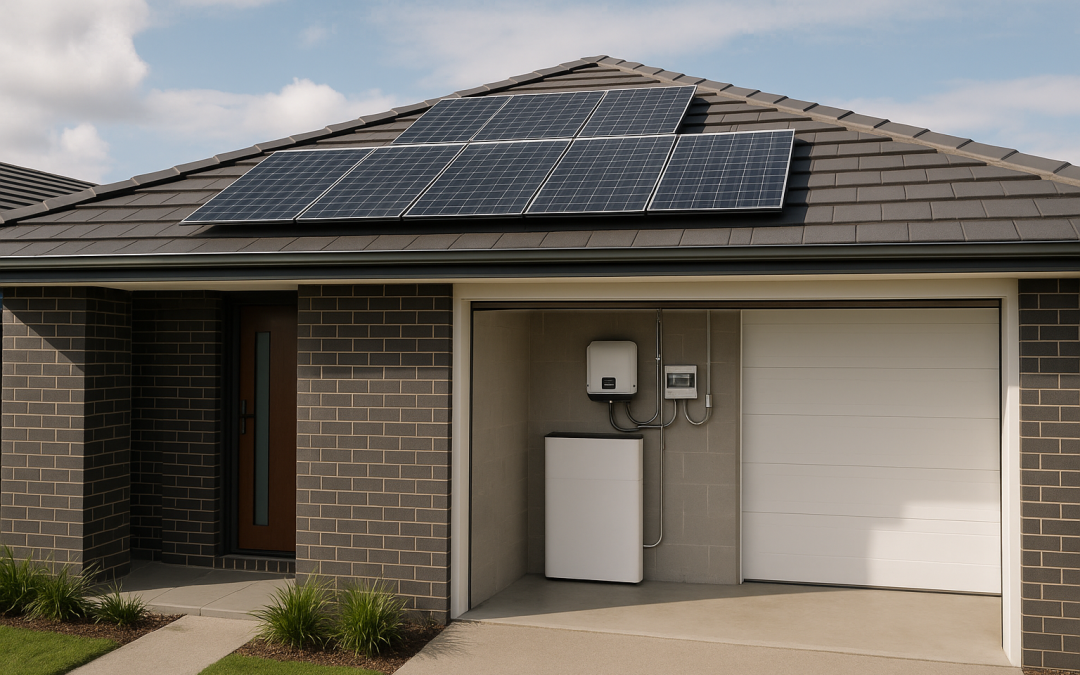
On-Grid Solar Battery Storage in Australia (2026): Quick Answers Before You Buy
If your power bills are high at night but low during the day, a battery bridges the gap. Storing your own solar energy cuts night-time imports and can provide backup if set up correctly.
This guide covers: how on-grid batteries work, what they cost, how to size them, design essentials, and what to know about backup for Australian homes.
What Is On-Grid Battery Storage? (vs Off-Grid)
On-grid battery storage is for properties still connected to the electricity grid. During an outage, only designated circuits (if set up) get backup; the rest of your home relies on the network.
Off-grid systems are standalone. They require bigger batteries, solar arrays, and often a generator.
A typical on-grid battery system:
- Solar PV system (kW): total panel capacity
- Solar inverter: converts solar DC to AC power
- Battery (kWh): energy available after sunset (focus on usable kWh)
- Battery/hybrid inverter: manages battery charging/discharging
- Monitoring/metering: tracks usage, export, and imports in real time
Key terms:
- kW: instant power rating
- kWh: total energy storage
Rule: Your battery must disconnect from the grid during a blackout to protect lineworkers.
Why Interest Is Rising in QLD and NSW
More households are considering batteries due to:
- Lower feed-in tariffs (FiTs): Selling power back earns less now.
- Higher peak rates: Network time-of-use charges spike from 4–9pm.
- Storm-related outages: Blackouts remain common, especially in summer.
- Export limits: Solar exports are often capped, causing wasted midday generation unless it’s stored.
Note: Every state and DNSP (your network operator) has its own approval rules and application steps. Always check local requirements early.
Common System Types (Inverter + Battery)

Hybrid Inverter
Hybrid inverters combine solar and battery management in one unit. Great for new builds and full system upgrades.
Battery-Ready Inverter
“Battery-ready” means you can add an approved battery model later. But:
- Not all batteries are compatible—get the list.
- Backup (EPS) features may be optional and need extra hardware or software.
- Firmware upgrades may add costs.
Tip: If deferring the battery, clarify company/model compatibility and how backup features work.
AC-Coupled Battery
An AC-coupled battery connects via your home’s AC wiring and has its own internal inverter. Good when keeping your existing solar inverter.
DC-Coupled Battery
A DC-coupled battery connects on the DC side with your panels. Common in new installs or major upgrades.
At-a-Glance Pros and Cons
| Option | Best for | Pros | Cons |
|---|---|---|---|
| Hybrid inverter + DC battery | New or full upgrade | One box, integrated monitoring, solid backup | May need to replace working inverter |
| Battery-ready inverter | Staging upgrades | Can delay battery cost | Brand and backup limits; may need extras |
| AC-coupled battery | Retrofits | Keeps old inverter | Slight efficiency loss; check space |
AC-Coupled vs DC-Coupled: Which Suits You?
- AC-coupled: Retrofitting, want minimal disruption. Ideal if existing inverter is solid.
- DC-coupled: New installations, one-brand solution. Fewer conversion steps.
AC-coupling is a bit less efficient but keeps legacy systems going.
What Do You Gain (And What Not)?
A battery helps you use your solar after dark (self-consumption). It won’t generate extra solar, but will help you buy less from the grid.
Benefits: Store and Use More of Your Solar
Batteries are most valuable when:
- Your FiT is low
- Your usage is highest at night (4–9pm)
- Daytime usage is lower or exports are capped
If home is busy during the day, most solar may already be used—less battery cycling, less savings.
Backup Power: Only for Essential Circuits
Most setups only back up select “essential” circuits, not the whole house.
Essentials typically include:
- Fridge/freezer
- Main lighting
- WiFi/device charging
- Garage door or key medical devices
Big loads (AC, hot water) need a larger and costlier battery and special wiring.
Ask your installer:
- What’s backed up by default?
- Can you choose backup circuits?
If the battery is flat during a blackout, it won’t provide backup until recharged by solar.
How On-Grid Solar + Battery Systems Work
- Day: Solar runs your home first; surplus charges the battery or is exported.
- Evening: Battery discharges, covering expensive peak usage.
- Night: Grid supplies extra once battery is empty.
Some plans allow night-time grid charging, but this can affect battery warranty/returns.
Backup features usually reserve some charge for outages, slightly reducing bill savings.
On-Grid vs Hybrid vs Off-Grid – At-a-Glance
| System type | Grid? | Battery? | Main aim | Best for |
|---|---|---|---|---|
| On-grid solar | Yes | No | Daytime grid savings | FiT or day-use homes |
| On-grid + battery | Yes | Yes | Night-time savings (plus backup) | Most homes |
| Hybrid | Yes | Yes | Integrated backup/control | Outage-prone homes |
| Off-grid | No | Yes (large) | Full independence | Rural/remote |
The Three Most Common On-Grid Battery Set-Ups

A. Hybrid Inverter + Battery (New Installs)
Best for new builds or if your inverter is ageing. Delivers neat integration and stronger backup, but may replace a working inverter. (Hybrid guide)
B. AC-Coupled Battery (Retrofit)
Great if your current solar is under warranty. Works alongside most inverters, allows upgrades without big changes. Slightly less efficient.
C. Off-Grid Style (Specialised)
Larger system and battery, plus generator for total independence. See our off-grid guide.
Battery Sizing (kW and kWh) Made Simple
Aim: Match your evening needs, surplus solar, and desired backup.
1. Estimate Evening/Night Usage (kWh)
- Check smart meter or bills for night use (typically 8–12 kWh for a 2–4 person home)
- If regularly over 20 kWh after 4pm, look at shifting some loads (pool, hot water) to daylight if possible
2. Know Your Solar Surplus
- Big batteries only help if you have excess solar
- If you hit network export caps or have consistent midday exports, a battery can catch this
3. Check Battery Output Power (kW)
- High loads (cooking, AC, pumps at once) may exceed battery output and trigger grid imports
- Most homes need about 5 kW continuous output to cover normal peaks
Example: Typical TOU Home
- Solar: 6.6 kW
- Evening/overnight use: 10 kWh
- Daytime export: 12–18 kWh
- Suggested battery: 10 kWh usable, 5 kW output or higher
Note: Make sure warranty covers “usable kWh” and specify total throughput guarantees.
What to Look for in Battery Specs
- Battery power (kW): Determines what you can run at once
- Depth of discharge (DoD): Look for 90–100% (for usable kWh)
- Round-trip efficiency: Higher is better; 85–95% typical
- Cycle/throughput warranty: Some warranties are time-based, some usage-based—read the fine print
- Battery management (BMS): Check temperature/heat ratings for Aussie summers, especially for garages or outdoor installs
Typical Costs in 2026 (Australia)
- Add-on battery (existing solar): $9,000–$16,000
- Battery + new inverter (hybrid): $12,000–$22,000
- Full solar + battery hybrid: $18,000–$35,000+
Price Factors:
- Battery size/output
- Inverter or switchboard upgrades
- Backup complexity (essential vs whole home)
- Installation type (cabling, property access)
Compare quotes for usable capacity, supported inverters, backup included, and warranties. Safety upgrades (old switchboards) are extra but often required.
What Drives ROI? (Tariffs, FiTs, Usage, VPPs)
- TOU tariffs: Best return if you have big, regular evening loads at high peak rates
- FiTs: Lower FiTs make storing and using your own solar more attractive
- Export limits: Batteries help you avoid wasting solar during export caps
- Usage patterns: Keep night-time and evening usage high for best payback
- VPPs: Some join Virtual Power Plants (VPPs) to sell battery power back. Review cycling limits and warranties first.
Solar Inverters: What to Check When Adding a Battery

Focus on:
- Compatibility with future batteries
- Certified brands/models for backup features
- Single vs three-phase (impacts backup)
- Australian supplier/warranty support
- Consumption metering to track usage
- De-rating behaviour in peak heat (reduced output at high temps)
Backup Power: What Does “Backup” Really Mean?
- Batteries only supply backup if installed for it (requires switchboard change for essential-circuit board)
- Backup (EPS) usually covers just key appliances; whole-home requires much bigger systems
- Legally must disconnect from grid in blackout (anti-islanding)
- Battery backup lasts as long as there’s charge left
Question to ask: Which devices stay on, for how long, and does garage/medical need specific coverage?
Compliance in Australia (Must-Haves)
- CEC-approved products: for rebates and insurance
- Inverter and battery compliant to AS/NZS 4777.2 & AS/NZS 5139
- CEC-accredited installer: essential for paperwork and grid connection
No documentation? Don’t proceed.
Adding a Battery to Existing Solar: Issues to Watch
- Old/small inverter may require replacement
- No consumption meter limits efficiency
- Old switchboards often need upgrades for safety
- If your solar is 7+ years old, compare add-on batteries vs full upgrade costs
Common Mistakes & Myths
- “A battery gives full backup.” False unless designed that way.
- “kWh is all that matters.” Both kWh (storage) and kW (output) matter.
- “Battery-ready means free battery choice later.” Compatibility is limited.
- “Any solar installer can do batteries.” Extra battery qualifications (AS/NZS 5139) are required.
Battery Types to Consider (2026)
- Integrated hybrid: Best for new builds/upgrades, single-brand support
- AC-coupled/retrofit-friendly: For keeping existing inverter
- Modular: Scale up as needed (check limits)
- Backup-focused: Designed for frequent outages
Work with an expert installer to match system type to your preferences for bill savings or backup.
On-Grid “House Batteries” vs Off-Grid Batteries
- On-grid batteries: Shift solar to expensive evening slots, backup for a few essential circuits
- Off-grid batteries: Larger, generator-backed, tight load management
Fully off-grid in town is rare – grid tie-in with battery backup is nearly always more cost-effective.
See our remote area solar guide
Location Notes: Coastal, Regional and Weather Considerations
- Coastal: Weatherproofing and corrosion resistance matter
- Storm-prone: Priority for secure mounting and waterproofing
- Regional / frequent outages: Value backup features more
Coastal homes (Ballina, Byron, Tweed) work hard in summer on AC; inland homes (Tamworth) focus on winter heating and overnight use.
Battery Installs in Brisbane/SEQ: What to Plan
Heat & Ventilation
- Garages and outdoors: Needs shade and airflow
- Avoid hot rooms, sun-baked walls
- Summer derating (auto power reduction) is common when batteries get too hot
Mounting: Garage vs Outdoor
- Garage: Secure, but may get hot—ventilate well
- Outdoor: Needs shade, weatherproofing, correct mounting, cable sealing (follow AS/NZS 5139)
Storm Readiness & Water/Flood Protection
- Elevate batteries, use flood-safe walls and fittings
- Seal all cable entries, but don’t block ventilation
- In cyclone zones (N QLD), check cyclonic ratings
Essential Circuits/Backup
- Decide “essential” loads before install (fridge, lights, modem)
- Large loads (AC, hot water) generally not included without bigger, costlier batteries
- Plan your essential circuits before switchboard work
Next Step: Get a Personal Recommendation
For right sizing and value:
- Use 3–6 months’ bills or smart meter logs
- Know if your home is single or three-phase
- Decide if you want bill savings, backup, or both
- Check for network export limits
Ready for advice? Book a solar + battery assessment with Freedom Energy Solutions for a tailored system and quote.
Read more: Freedom Energy Blog

FAQ: On-Grid Solar Battery Storage in Australia
Can you use a battery during a blackout?
Yes—if your battery system is wired for backup (essential circuits only). Standard systems shut down in blackouts.
Difference between on-grid, hybrid and off-grid?
- On-grid battery: Tied to the grid, shifts solar to night, supports partial backup
- Hybrid: All-in-one, grid-connected, strong backup potential
- Off-grid: No grid connection, relies on bigger batteries and a generator
Is a hybrid inverter worth it?
Yes, for integrated installs or planned blackout protection. Retrofitting an AC-coupled battery is often better for newer inverters.
What battery size for a 6.6kW solar system?
About 10 kWh usable is common. Sizing depends on how much surplus solar you have and how much you use at night; aim for about 5 kW output.
Does export limiting affect battery benefit?
Yes. If you regularly “spill” at midday, a battery captures that lost solar for your own use.
Can I add a battery to older solar?
Usually. AC-coupled batteries suit this. A hybrid inverter makes sense if your current one is near replacement.
Key battery warranty checks?
- Usable capacity (not just total)
- Cycle/throughput limits
- Local warranty agent
Do batteries save money if most solar is used during the day?
No. Batteries work best for those with surplus daytime solar.
Are inverters critical to battery performance?
Yes. The inverter controls charging, usage, and backup. For best results, use certified combinations.
How long does a battery run my house at night?
Depends on kWh size and your loads. Most aim to cover peak (4–9pm) and night essentials.
Should I upsize my solar if adding a battery?
Usually, yes. More generation means more chances to charge the battery, especially in winter.
Do batteries lower my carbon footprint?
Yes, by pushing more of your own solar into night-time, reducing grid reliance. But bill control remains the main motivator for most.
Recent Comments